
Company Updates

Minahil Mansoor

Last updated:
May 2026
Read time:
12
mins

Every recruiter has used AI by now. And 90% of them have the same problem: copy the candidate notes, paste them in, write the prompt, get the output, copy the output back. Repeat forty times a day. That just means the AI isn’t working for the recruiter. The recruiter is working for AI.
The reason it feels like that is simple: AI tools can't see inside the software recruiters use. They're blind to what's in the ATS, what was said on the last call, which candidates are stalled in the pipeline. Unless a recruiter manually feeds that context in, the AI is guessing.
MCP fixes that at the root. Here's what it means in practice.
MCP stands for Model Context Protocol. It's an open standard, introduced by Anthropic in late 2024, that allows AI models (like Claude or ChatGPT) to connect directly to external tools, databases, and apps in real time. Think of it as a universal translator between an AI and every piece of software a recruiter already uses.
Without MCP, an AI is essentially blind to anything outside its chat window. To use it with candidate data, a recruiter has to download resumes, copy notes from the ATS, paste in email threads, and manually rebuild context every single time.
An MCP connector removes that friction entirely. It acts as a secure bridge between the AI and the source system. The AI reaches into the ATS, the inbox, the resume folder, or the candidate database directly. It then reads the data in real time and writes back to it if the user’s permissions allow.
According to Grand View Research, the AI recruiting tools market was valued at $590 million in 2023 and is projected to reach $1.1 billion by 2030. But most of the "AI" in that market is bolted onto existing software. A summarisation button here, an auto-fill feature there, rather than genuinely embedded in the workflow.
73% of talent professionals believe AI will change how recruiting works. But less than a quarter report meaningful AI adoption in their day-to-day workflows. That is because of one reason: using AI manually is a job in itself.
Before a recruiter gets anything useful out of Claude or ChatGPT, they're copying notes out of the ATS, pasting in candidate details, rebuilding context from scratch. Every single session. It's slow enough that most people stop bothering.
MCP removes that setup entirely. Instead of a recruiter feeding data to the AI, the AI connects directly to the tools where the data is and works from there.
An MCP connector isn't a replacement for the AI already inside CoRecruit. It works as an add-on.
CoRecruit already runs intelligence at the workflow level: every call is automatically transcribed and summarised, notes are filed to the right candidate or job in the ATS the moment a call ends, and follow-up emails or client summaries can be generated directly from call content, all without a recruiter typing a word. That built-in automation handles the routine.
CoRecruit's MCP connector does something different. It opens CoRecruit's data (the call notes, the candidate records, the ATS sync logs, the job history) to Claude and ChatGPT (or any LLM you use) as a live, queryable resource. Instead of the AI only doing things automatically inside CoRecruit, a recruiter can now bring their own AI assistant to the data and ask it anything.
Some recruiters will mostly work inside CoRecruit and use the MCP connector occasionally, like for complex queries, bulk analysis, or one-off tasks. Others will spend a chunk of their day in Claude with CoRecruit connected, running the kind of work that used to require a researcher or a reporting tool.
Both approaches work. The point is that CoRecruit's data, built up over every call a recruiter has ever made, is now fully accessible in real time, through any AI tool they want to use.
MCP is also what makes AI agents work in recruiting. An agent doesn't just answer questions, but it completes repetitive tasks autonomously. But it needs live, persistent access to real data.
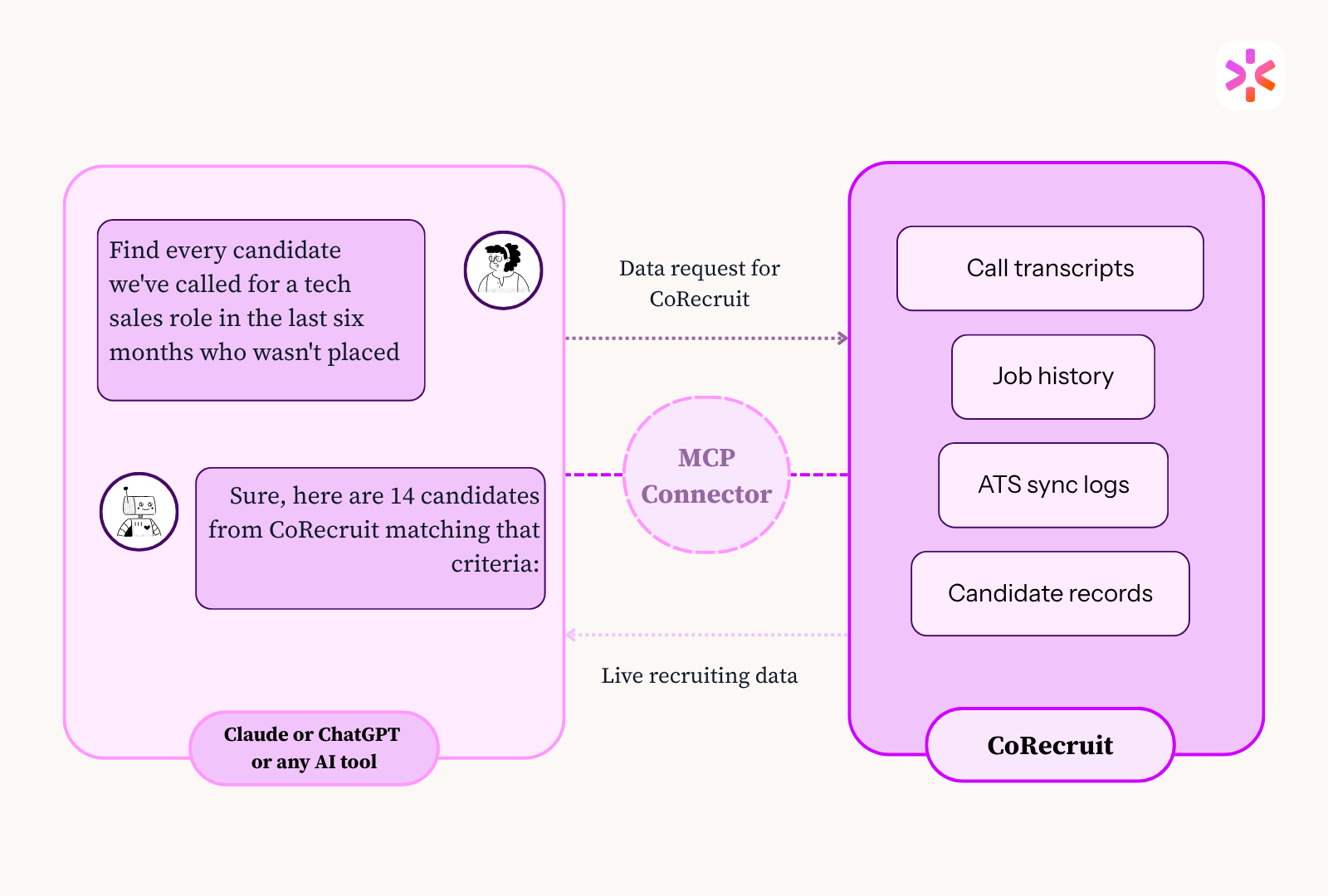
The best way to understand what MCP helps with is to see what becomes possible the moment CoRecruit is connected to Claude or ChatGPT. CoRecruit's MCP connector and the call notes, candidate records, and job data CoRecruit already holds.
For agency owners and team leads:
What used to mean manually trawling through records and building a report from scratch now takes one prompt.
For recruiters working live roles:
This is the work that currently means jumping between CoRecruit, the ATS, and a blank document. With MCP, it's handled in one place.
For pipeline and operational hygiene:
CoRecruit's call data, notes, and ATS sync logs stop being a record of what happened and become an active resource the AI can query, analyse, and act on.
AI agents aren't going to replace recruiters. But they are going to handle the parts of recruiting that don't need a human anymore. And that’s the main reason why more than half of talent leaders plan to deploy autonomous AI agents in 2026.
An AI agent is not an assistant a recruiter asks questions to, but it's a system handed a task and left to complete it. "Go through all of this month's CoRecruit call notes, identify the five strongest candidates for the VP Sales role, and draft personalised follow-up emails for each one. Come back when they're ready."
For an agent to run that, it needs secure, persistent, real-time access to the underlying data. A static report won’t do it. It needs the actual call records with read and write permissions, operating within the recruiter's own access controls. CoRecruit's MCP connector provides exactly that.
The 1000+ agencies using CoRecruit now are building on infrastructure that supports autonomous agents as they mature. Agencies without it will manage fine, until they try to do something more than ask a one-off question. That’s when not using it becomes a problem.
Recruiting has always been about relationships and judgment. MCP doesn't change that. It removes the administrative layer sitting between a recruiter and the work that has more impact. So the time spent on data entry, context-switching, and manual reporting goes to candidates and clients instead.
AI works better when it has access to real data. Recruiters work better when they're not the ones manually feeding it in
.svg)


%20LG.svg)

.svg)


