
AI in Recruiting

Josh Kirkham

Last updated:
August 2026
Read time:
9
mins

MCP is not some brand new invention. But it’s the most useful AI use case for recruiters because of what it lets you do with a database full of answers you've never had time to pull out.
And we spent an entire hour talking about it with our friends from Stardex.
Here's the thing about your ATS: it already contains almost everything you need to know about where your business is stuck. Every won deal, every lost deal, every call your team has had. Pulling that information out used to take hours. Now it takes a conversation.
I want to walk through: what an MCP connector is, how Stardex and CoRecruit work together, and the three-step setup that let me run a full team audit on my own business development calls in about twenty minutes.
Let’s start.
MCP stands for Model Context Protocol. It's the standard that lets an AI agent, Claude, ChatGPT, whatever you use, plug directly into a piece of software and pull real, live data from it while you're talking to it. Not a copy-pasted export. Not the model guessing from memory. The current state of your pipeline, your calls, your candidates.
We put it this way: MCP is not a chatbot that’s added to your existing tools. It’s how the tools you already use become an AI agent that can reach into and work with directly.
Stardex is an AI-native ATS and CRM built for search firms. It's where your candidate database and your pipeline live. CoRecruit joins every call your team takes, phone, video, in-person, and logs the notes and next steps back into whatever ATS you're running, Stardex included.
Separately, each connector gives an AI agent half the story. Stardex has the pipeline: which deals closed, which died, what the pipeline's worth. CoRecruit has the calls: what was said, what came up, what got promised. Connect both to the same agent, and you can ask one question and get the full picture back.
Let’s take an example here that we shared live on the webinar:
We asked Claude to review the pipeline on a Monday morning, and it came back with 17 deals, about a million dollars in pipeline, and a 44% win rate, pulled straight from Stardex. It didn't stop there. Next, we asked why they were losing deals, and Claude went through the call notes and found a pattern: the firms beating them to a close had shown up to the first meeting with a relevant candidate network already lined up. The deals they won, they'd shown up with a market map and proof of similar searches they'd run before. That's the answer you only get when the AI can see both the outcome and the conversation behind it.
You can do this from your phone, by the way.
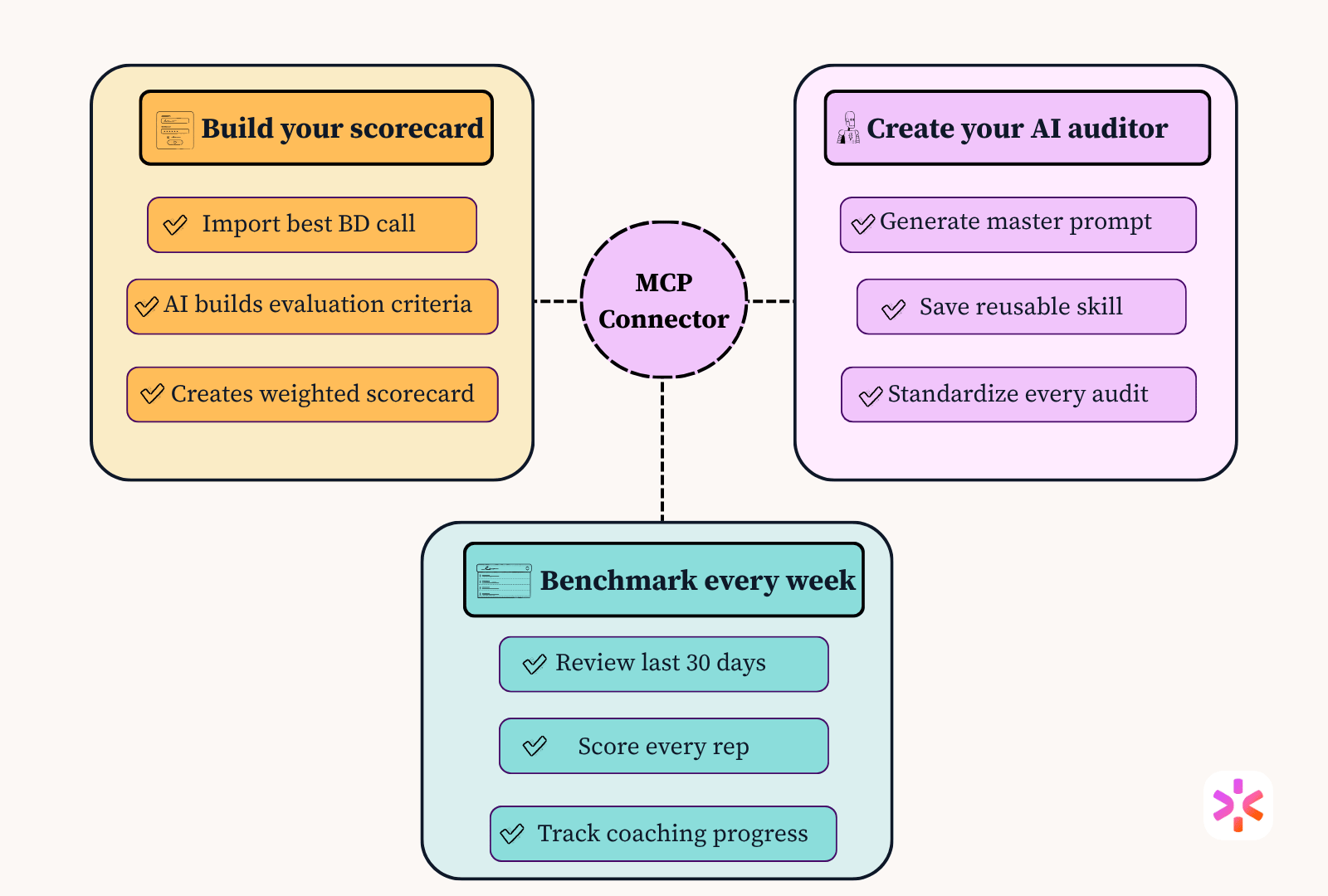
This is the part I walked through live on the webinar, and it's very simple.
Grab a transcript of a strong business development call, feed it to your AI agent, and ask it to build you a scorecard: categories, weighting, a score out of five each. Then ask it the one question I always ask: "what other information would you need to make this great?"
Let the AI ask you the follow-up questions. That's the whole secret to using AI well.
Take what the scorecard taught the AI about what good looks like, and ask it to write a master prompt for your system instructions, so every future request runs the same audit. I also asked for a Claude skill out of the same conversation. Think of the prompt as the steps you want followed, and the skill as the definition of what good looks like. Both get saved once. You use them forever.
Point the agent at the last 30 days of business development calls through the connectors, filtered specifically to that call type, not candidate interviews, not reference checks. Get individual and team-level scores. Then run it again every week to see if coaching is landing.
I ran this exact setup against a sample dataset on the webinar. Team-wide, the weakest category was prep and research, with low scores across the board on agenda-building and trust too. That backed up exactly what our friend, Sanket from Stardex, had found from the pipeline side: we weren't showing up prepared.
The numbers in that specific demo were an illustrative, anonymized example built for the webinar, not a published customer result. But it shows what this setup is built to catch: a specific, coachable behavior, not a vague sense that "business development could be better."
Run it week over week and it gets more useful. In my demo, after a training session, four out of five reps improved noticeably; one went from an 11 out of 25 to an 18. One rep didn't move. That's not a bad thing to find out. It tells you whether you're looking at a skill problem or a will problem, and those get coached completely differently.
I want to be direct about this: this setup does not replace manual inspection. It replaces the 2 to 3 hours of report-pulling that used to come before inspection. You still need to listen to the calls that count, still need to have the coaching conversation, still need to make the call on who's a skill issue versus a will issue. What changes is how fast you get to the point where you know what to look at.
Once you've got the audit running the way you want, you can push it further. I use Cowork to run this every Monday at 8am and drop the results straight into a Slack channel for the whole team to see. People in this business are competitive. Nobody wants to see their name at the bottom of a leaderboard two weeks in a row.
None of this is really about MCP, or about Claude, or about any one tool. It's about what happens to your business the moment you stop guessing where the problem is and start proving it.
Every agency owner I know has a hunch about where their funnel breaks down. Most of them never get past the hunch, because getting to proof used to cost a whole afternoon they didn't have. That cost is basically gone now. You can build this setup once, on a car ride or a dog walk if that's genuinely your schedule, and have it running week over week without ever opening a spreadsheet.
I'm Josh Kirkham at CoRecruit. We connect to Stardex and 20+ other ATS platforms via MCP, join your calls, and log the notes automatically. Try it free for 7 days.
.svg)


%20LG.svg)

.svg)


